
Build kit: Santa hats on avatars
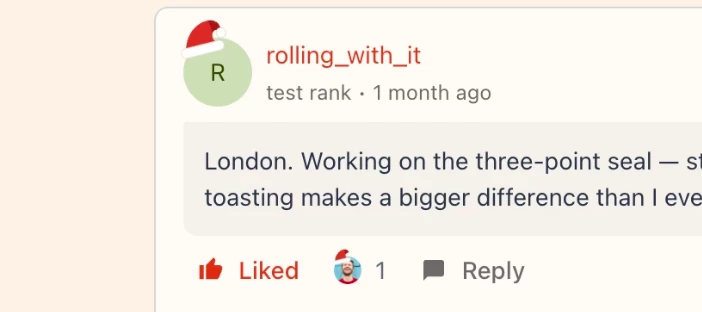
This adds a Santa hat to the top left corner of member avatars. It is one block of CSS and needs no widget. Members see the hat on the header avatar, in topic lists, in replies, on leaderboards and on the default initial avatars.
Where it goes
If you are using Developer Studio: put the CSS in a global stylesheet. In the starter template this means a folder such as stylesheets/santa-hats/ with a style.css file (the code below) and a stylesheet.json file that holds a name and a description. Run ./bin/build-registry.sh, then commit and push so GitHub sync picks up the change.
Just code, without Developer Studio: On the homepage, open Styling > Custom CSS, paste the CSS and save.
The code
/* Santa hats on member avatars (holiday season) */
div.avatar::after {
  content: "";
  position: absolute;
  z-index: 2;
  top: -34%;
  left: -6%;
  width: 78%;
  aspect-ratio: 100 / 80;
  background: url("data:image/svg+xml,%3Csvg xmlns='http://www.w3.org/2000/svg' viewBox='0 0 100 80'%3E%3Cpath d='M16 62C22 34 44 13 70 14C85 15 93 26 89 40C84 33 77 33 73 39C69 46 73 55 79 62Z' fill='%23D63A2F'/%3E%3Cpath d='M70 14C85 15 93 26 89 40C84 33 77 33 73 39C72 30 74 20 70 14Z' fill='%23A9261F'/%3E%3Ccircle cx='89' cy='42' r='9' fill='%23FFFFFF' stroke='%23E6DED3' stroke-width='1.5'/%3E%3Crect x='7' y='55' width='82' height='18' rx='9' fill='%23FFFFFF' stroke='%23E6DED3' stroke-width='1.5'/%3E%3C/svg%3E") center / contain no-repeat;
  transform: rotate(-14deg);
  transform-origin: 50% 100%;
  pointer-events: none;
}
How it works
Every native avatar sits inside a div.avatar wrapper that is not clipped. The round crop happens one level down. That is why the hat can sit outside the circle.
How to change it
To change the size or position, adjust these values:
- top: a more negative value lifts the hat higher above the avatar.
- left: a more negative value moves the hat further to the left.
- width: the hat width as a share of the avatar width. The height follows from the aspect ratio.
- rotate: the tilt in degrees. A negative value tilts the hat to the left.
How to test it before the season starts
CSS has no date logic, so the hats show to every visitor as soon as the CSS is live. To check the result earlier, open your community, open the browser developer tools and add the same rule in a new style element. Nothing is saved, and only you see it. Look at the header avatar, a topic list, a topic with replies and a leaderboard.
Limits and known gaps
- There is no date check. You add the CSS in December and remove it after the holidays.
- The notification center shows no hats, because it clips its avatars.
- Avatars inside Developer Studio widgets show no hats, because page CSS cannot reach into Shadow DOM.
- The rule depends on the div.avatar wrapper. If the platform changes that markup, the hats can disappear or move.
How to remove it after the holidays
Legacy setup: delete the rule from Customization > Custom CSS and save. Developer Studio: delete the stylesheet folder, run ./bin/build-registry.sh, then commit and push.